
Find Help for Your Issue
| What went wrong | Start here | What to check |
|---|---|---|
| The game will not open, or there is no betting panel | Game access | A blocked launch, viewing mode or display problem |
| A placement was rejected, or the connection dropped after a tap | Bets and interruptions | Which stakes were accepted and whether the round closed |
| The return or balance differs from your expectation | Payout and balance | The accepted layout, credited amount and net round change |
| A number, page link or feature on this website is wrong | Website issues | The page and behaviour to report through Contact |
Ice Fishing Will Not Load or Has No Betting Panel
Use these launch steps when no bet could already have been accepted. If the window froze after a placement, follow the interrupted-round steps first.
| What you see | Next action |
|---|---|
| A blank window or loading error before any placement | Reopen the launch once. If it remains blocked, retain the exact error and the time of the attempt |
| A sign-in, access or unsupported-device message | Follow the message in that game service; record which required step fails |
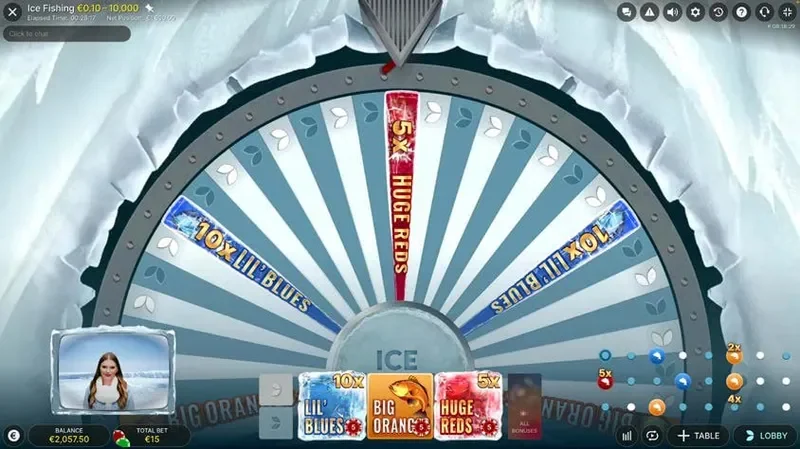
| The host and wheel are visible, but there are no betting controls | Check whether this is a video-only preview; the mode comparison shows how to recognise viewing, practice and cash play |
| The betting fields or TOTAL BET are clipped on a phone | Adjust the view between rounds; fullscreen and orientation guidance explains the display task |
| The picture plays without audio | Inspect the game’s Sound setting and device media volume using the sound guidance |
An access report should include the launch or service used, device, browser, date and time, exact message and whether the problem appeared before or after a placement. That last detail changes the investigation from failed access to a possible accepted bet.
Practice requires an available interactive mode with virtual credits. A video preview does not provide that mode, and a cash session uses its linked account balance. The demo loading guidance addresses the mode and access distinction.
A sign-in or account-access problem belongs with the game service’s support. If a link on this website leads to the wrong page or fails before reaching the launch, report that as a website issue.
Rejected Bets and Interrupted Rounds
A tap can be rejected even though you tried to place a chip. Check the field amounts actually accepted and TOTAL BET, especially after repeated taps, All Bonuses or Double.
A Placement Was Rejected
Read the rejection message alongside the betting status, balance and field limit:
- Betting has closed: another placement cannot enter that round. Check the earlier accepted field amounts before the next betting window.
- Funds or a field limit prevented an addition: read the resulting field amounts. Earlier placements may still be accepted even when the latest addition fails.
- Double did not produce the intended layout: doubling in full requires enough balance and room within every backed field’s limit. Read the actual fields and total; the selected chip does not show the result of Double.
All Bonuses places the selected amount on Lil’ Blues, Big Oranges and Huge Reds. A €1 selection requests €3 across those fields, plus any Leaf stakes already placed. The cost of that full layout matters when investigating a balance rejection. The placement and control rules explain how Repeat, Double and Undo change it.
The Connection Dropped After a Placement
Jokerbet’s published live-game policy separates interruptions during betting from disconnection after closing:
| Situation | What follows |
|---|---|
| The game was minimised or its browser tab hidden while betting was open | Current bets can be rejected; check which field amounts remained accepted |
| Betting had closed and there was a valid placed bet | The bet remains in the round and resolves in your absence; reconnect and inspect History |
| You are unsure whether betting had closed or the stake was accepted | Check the round and account records; ask session support to confirm the betting stage and accepted amounts |
| The notice says the round is paused | Follow the notice while the issue is investigated |
| The notice confirms cancellation because the error could not be resolved immediately | Jokerbet’s policy returns the initial stakes to participating players |
If the picture freezes, use the game notice and account records to check the round’s status. For a confirmed cancellation, check the returned initial stakes under the refund policy.
The accepted-bet and disconnection rules set out that policy. On a phone, the connection guide also separates open-window hiding from a closed-window disconnection. Practice-mode balance and history retention depend on the selected mode.
A Payout or Balance Looks Wrong
For a completed round, identify the accepted layout, winning field, final return factor and actual credit. Leaf 1 and Leaf 2 are separate fields; Blue, Orange and Red refer to Lil’ Blues, Big Oranges and Huge Reds.
The winning field’s accepted stake determines its return. The full cost includes the other accepted stakes too:
Net round change = credited return − TOTAL BET.
A final fish multiplier already includes any applicable fish boost. Multiplying it by the boost again overstates the expected credit. The base and final multiplier explanation distinguishes those values.
Reconcile the Balance Change
Consider a hypothetical completed round with €1 on Leaf 1 and €1 on each fish field, all accepted. Leaf 2 is unbacked, so TOTAL BET is €4. Blue wins at a final 3×.
This example follows the SNAI fish-settlement convention: the €1 winning Blue stake credits €3, without adding that stake again. No payout is capped. For an account record that lists the stake cost as a separate debit and the return as a credit, the reconciliation would be:
| Account item | Hypothetical amount | Meaning |
|---|---|---|
| Balance before this round | €100 | Starting point for this comparison |
| Accepted round cost | −€4 | All accepted stakes, including the losing fields |
| Credited return | +€3 | The €1 Blue stake × final 3× |
| Net round change | −€1 | €3 credited minus €4 spent |
| Balance after this round, with no other activity | €99 | €100 − €4 + €3 |
Compare one round in one currency and separate other bets, deposits, withdrawals or account transactions from that period.
The example follows separate stake and return entries; your wallet may display or time them differently. Reconcile the balance, then check the credit against the session’s payout rules, winning stake and any cap. A balance that adds up can still contain an incorrect credit. Rule documents also differ on fish stake return; use the round calculation method and cash-cap explanation when checking that amount.
Before Disputing a Credited Amount
Explanation diagram Scroll to explore
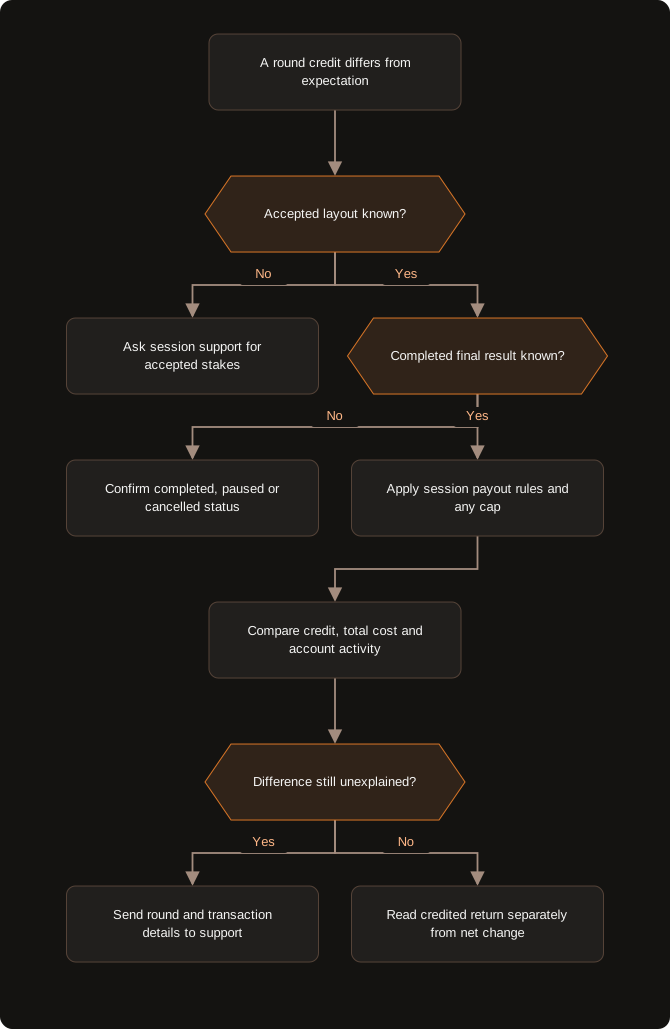
Start with accepted stakes and a completed result. A confirmed cancellation follows the initial-stake refund policy.
If History omits field amounts or a notice is unclear, request confirmation of those details. The current chip selection and a public wheel outcome do not reconstruct your accepted bet.
Details to Send to Game-Session Support
Open the support option in the game or the service account used for that session. Identify the question clearly: whether the bet was accepted, whether the round completed, or how the credit was calculated.
| Detail | What to retain |
|---|---|
| Round identification | Original Ice Fishing, date, time, timezone, table or session context, and round reference |
| Accepted layout | Amount on each field and TOTAL BET; note whether All Bonuses or Double was used |
| Round state and outcome | Game notice, completed winning field and final factor, or pause / cancellation status |
| Account amounts | Currency, credited return and relevant stake / payout transaction records, where available |
| Evidence of the problem | Exact error, time of the interruption and screenshots or records that show it |
Keep the date and table context with the round reference, and include the accepted field amounts separately.
If the accepted layout is missing, ask support for the field amounts. The personal History guidance explains which account records to use, while the accepted-state example shows how an accepted Double changes the calculation.
For a credit dispute, ask which winning stake, final factor, settlement convention and cap were applied. This makes the calculation question specific.
Report an Error on This Website
Use Contact for an incorrect rule or number, a broken page link, or a feature on this website that fails. Include the page URL, affected text or action, what happened and what you expected. For a factual correction, add the source and the condition or currency it applies to.
Account enquiries go to the game service’s support. For a bet or credit dispute, include the round and transaction details above.
Return to the Ice Fishing game page · Demo preview and practice exercises
Adults only · Responsible gambling