
On a phone, tap the fields and read TOTAL BET before betting closes. Keep the game visible during that window; switching tabs or minimising the browser can cause bets to be rejected.
Open the Ice Fishing game page · Demo and practice modes
Phone access · Betting controls · Loading and sound · Connection drops · Your round history
Open Ice Fishing on Your Phone
On Android or iPhone, open the game service’s mobile website or app and select Ice Fishing by Evolution. If entering through the main game page, follow its launch route and any sign-in or access message. A cash session uses the balance of the account attached to it; practice requires an available mode with virtual credits.

Before placing a chip, check the balance and betting panel. A video-only preview shows the host and wheel; an interactive session lets you place chips and shows the amount staked. The demo mode comparison explains how to recognise practice, cash play and viewing.
The betting panel contains Leaf 1, Leaf 2, Lil’ Blues, Big Oranges and Huge Reds. All Bonuses places stakes on the three fish fields. Keep those fields and the total visible as you tap; the five betting options explain which result each field covers.
Android and iPhone: Browser Access and Apps
Ice Fishing is offered through mobile-browser launches. On Android or iPhone, use a game service’s browser launch where it supports your device. The service’s access conditions apply; the active session supplies its account balance, currency and stake limits.
Ice Fishing App and APK Downloads
Some services include Ice Fishing in their casino apps. In that case, you open the game through the service’s app.
No standalone official Ice Fishing APK or iPhone app has been verified. Check who publishes an app before downloading it; the Ice Fishing name or a download badge alone does not confirm Evolution as its maker.
Keep the Betting Panel Readable
Set up the view before placing stakes. Follow the round in the video and read your field amounts and cost in the betting panel.
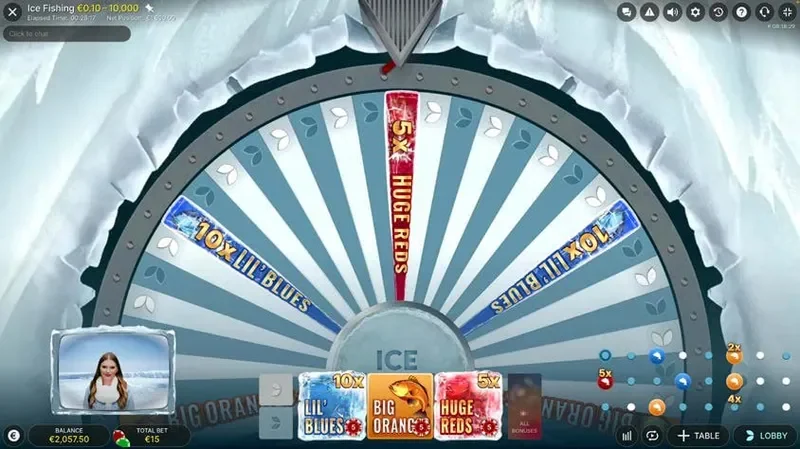
| Element | What it tells you | Why it matters when tapping |
|---|---|---|
| Chip selector | The amount for a placement | Selecting a chip comes before placing it on a field |
| Betting fields | Where each stake is placed | Another accepted tap can add to a field already backed |
| TOTAL BET | The sum across the current layout | Several fields and Double can cost more than one selected chip |
| Timer or betting indicator | Whether the betting window is open | A tap after closing cannot add a stake to that round |
| Balance and stake limits | Whether the requested layout can be funded and accepted | A larger layout may fail even when a smaller placement fitted |
The published client rules describe a timer in the immersive view and a green/yellow/red betting indicator in the classic view. Green means betting is open, yellow means it is about to close and red means it is closed. Follow the indicator in the view your launch actually uses.
Fullscreen and Screen Orientation
If the game launch offers fullscreen or a choice of view, select it before placing chips. Use the portrait or landscape arrangement that keeps the chip selector, fields, TOTAL BET and betting status readable together.
If part of the panel is clipped or hidden, adjust the view between rounds before attempting another layout.
Mobile Betting Controls: Track the Cost of Each Tap
Selecting a chip sets the amount for a placement. Tap a field while betting is open, then read the updated layout and TOTAL BET. Another accepted tap on the same field adds the selected amount again, up to the applicable limit.
For All Bonuses, the selected amount goes on each fish field. A €1 selection therefore adds €3 across Blue, Orange and Red. An existing Leaf stake remains part of the cost.
How a €1 Chip Can Lead to a €10 Round
This worked sequence starts with an empty layout and a €1 chip. Every addition is assumed accepted during open betting, with enough balance and room within the field limits for a full Double. Use the chip values offered in your session; these amounts illustrate how the cost builds up.
| Action | Layout after the accepted action | TOTAL BET |
|---|---|---|
| Select a €1 chip | No stakes placed | €0 |
| Tap Leaf 1 | €1 on Leaf 1 | €1 |
| Tap Leaf 1 again | €2 on Leaf 1 | €2 |
| Use All Bonuses | €2 Leaf 1 + €1 on each fish | €5 |
| Use Double / x2 in full | €4 Leaf 1 + €2 on each fish | €10 |
The selected €1 chip is not the price of the whole layout. For a fixed spending amount, the same-budget comparisons show how dividing it across fields changes the result.
Repeat and Double Apply to the Layout
Repeat is available in a new round before the first chip is placed. It restores the previous layout: a €10 layout repeated in full costs €10 again. A balance reduced by the previous round may no longer cover it.
Double / x2 is available after a bet has been placed and acts on all placed stakes. Leaf 2 stays unbacked in the example.
Doubling in full requires funds and stake limits for the whole layout. If a field reaches its limit, use the resulting TOTAL BET and field amounts rather than assuming everything doubled. The Repeat and Double rules set out these conditions.
Undo Removes a Placement While Betting Is Open
Undo removes the latest placement; successive uses work backwards through the bets. If two €1 taps on Leaf 1 were the only placements, undoing the second leaves €1 on that field. Hold the Undo button to clear the current layout while betting is open.
These controls edit the current betting window. They cannot reverse a completed round. Once betting closes, the accepted layout is fixed; boosts are revealed after closing.
Ice Fishing Not Loading or Responding on Mobile
If you tried to bet before the problem appeared, check which stakes were accepted before reopening the page or repeating the layout. Otherwise, start with the launch message below.
| What you see | Next action |
|---|---|
| A blank game window or loading error before placing any bet | Reopen the launch once and retain any error text if it remains blocked |
| A sign-in or access message | Follow that message in the selected launch; keep its wording if the required step fails |
| A video-only preview with no betting panel | Choose an available interactive mode if you want to place chips |
| A tap after the timer ends or the indicator turns red | Wait for the next betting window |
| A placement is rejected while betting is open | Read the rejection message, balance and field limit; confirm which earlier placements remain accepted |
| Part of the betting panel is hidden | Adjust the view between rounds so the fields, total and betting status are readable |
| The picture freezes or the connection drops after a placement | Use the connection and acceptance steps before interpreting the round |
If the launch remains blocked, note the phone model, browser, time and exact error message for mobile access help. Include whether the error appeared before or after you tried to bet.
Picture Plays but There Is No Sound
Check the game’s Sound control and the phone’s media volume.
With sound muted, follow the timer, betting status and accepted field amounts on screen. Check the game notice or History if the round is interrupted; missing audio alone does not show a rejection or cancellation.
Connection Drops and Accepted Bets
Jokerbet’s published live-game rules distinguish hiding the game while betting is open from disconnecting after betting has closed.
While the betting window is open, minimising the browser or switching tabs can cause current bets to be rejected. If the game was hidden before closing, check which field amounts were accepted before repeating those bets.
After betting closes, valid placed bets remain in the round and resolve in your absence. Reconnect and use History to find the result. If the video froze, check the completed result and game notice before deciding what happened to the bet.
Explanation diagram Scroll to explore
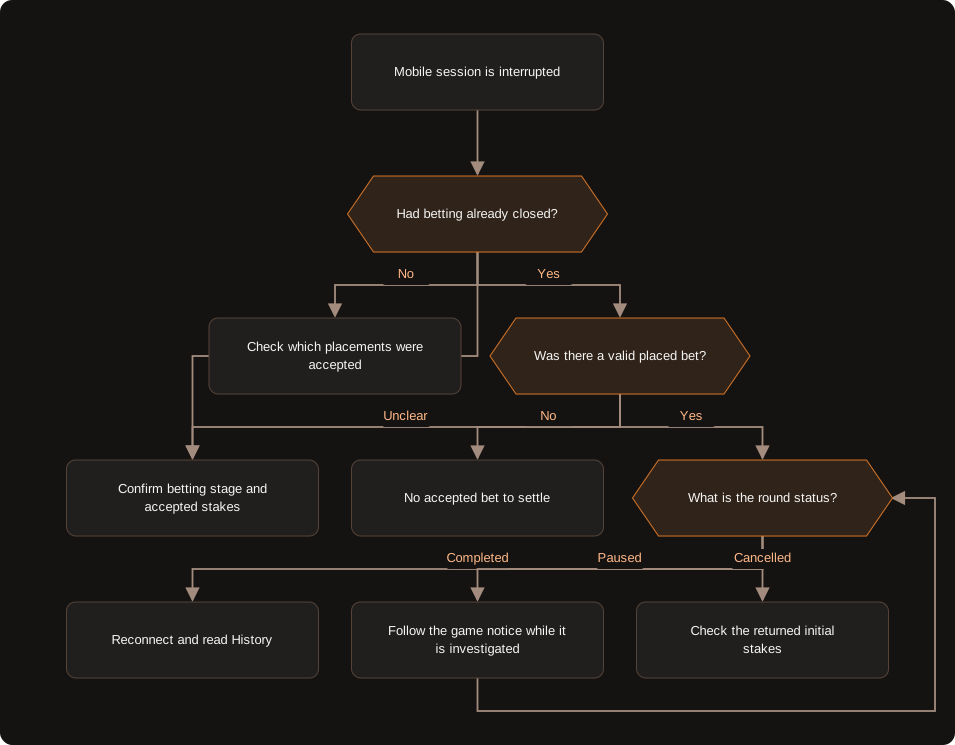
The branches follow the published live-game policy. Practice-mode balance and history retention depend on the selected mode.
For a paused round, follow the game notice while the error is investigated. Jokerbet’s policy cancels the round and returns the initial stakes if the error cannot be resolved immediately. Check the notice and account record for the cancellation and refund.
The accepted-bet and interruption rules explain the policy. When acceptance or the credited amount remains unclear, the support service attached to that game session handles the stake and balance question. Interrupted-round help explains what to retain for that enquiry.
Read Your Round After Reconnecting
Find the round in the game’s History. Compare its credit with the field amounts accepted at betting close, including any additions from All Bonuses or Double.
Retain:
- Date, time and timezone, together with the table or session context.
- Round reference and game notice, including any pause or cancellation message.
- Accepted field amounts and TOTAL BET, especially if All Bonuses or Double was used.
- Winning field and final return factor; the fish multiplier explanation separates a base fish value from the final boosted value.
- Credited return and transaction record, where available.
If the history view does not expose the complete accepted layout, use the account record or ask the session’s support to confirm it. A round reference identifies the event to discuss; it does not, by itself, prove which of your stakes was accepted. The personal game-history guidance distinguishes your account settlement from a public wheel result.
Check Whether Double Was Accepted
Suppose the wheel result is Blue with a final 3× return. The two layouts from the tap sequence would settle differently. These are hypothetical completed rounds, using the SNAI fish-settlement convention: winning fish stake × final multiplier, without adding that fish stake again. All listed stakes are accepted and no payout is capped.
| Accepted layout | TOTAL BET | Blue stake | Credited return at 3× | Net result |
|---|---|---|---|---|
| Before Double: €2 Leaf 1 + €1 on each fish | €5 | €1 | €3 | −€2 |
| Full Double: €4 Leaf 1 + €2 on each fish | €10 | €2 | €6 | −€4 |
Net result = credited return − TOTAL BET.
Read the accepted Blue stake and TOTAL BET to choose the calculation. Both layouts use the same selected €1 chip, so a screenshot of the chip alone cannot tell you whether Double went through. The other stakes explain the net loss despite the Blue win.
If Double was limited or only some additions were accepted, reconstruct the actual field amounts instead of choosing either worked example automatically. The payout and net-result example gives the calculation method.
Practise the Phone Controls Before Using a Cash Balance
When an interactive practice mode is available, use virtual credits to place a single-field stake, add All Bonuses and inspect the new total. In a separate round, try Double and Undo while betting is open. The phone practice guidance and control exercises give those tasks without relying on a real-money balance.
For a cash session, set the whole round budget before the first placement. Keep the game visible and compare the accepted total with that amount after additions or Double.
Open the Ice Fishing game page · Get help with mobile access
18+ · Responsible gambling